ExtensionDash: Tracking an Extension From the Agent
I have shipped two browser extensions this year — Reverse Image Search Anywhere and Stackpeek — and after the second one I noticed I could not answer the simplest question anybody asks about a listing: is it working?
Both stores will tell you how many people installed the thing. Neither will tell you the number that decides whether anyone installs it at all: where you appear when someone searches the words they would actually type. The Chrome Web Store developer dashboard has no notion of search position. Firefox’s is no better. So the honest answer to “did last week’s title change help?” was to open an incognito window, type the keyword, and count down the results with my finger. Which I did. Repeatedly. In three languages.
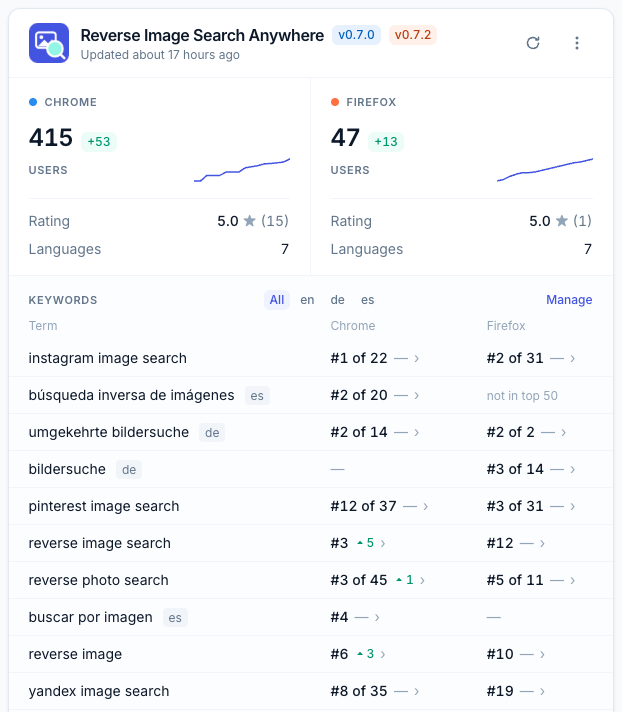
So I built ExtensionDash. It scrapes both stores every night, records installs, ratings, category rank, keyword positions, competitors and listing copy, and keeps the history. It is free during the beta.
The decision that mattered
The interesting choice was not the scraper. It was that the agent is a first-class reader, not an export button.
POST /mcp speaks the Model Context Protocol over stateless HTTP, authenticated with a per-user token rather than the session cookie. Fifteen tools. Eleven read; the four that write are two mirrored pairs, keywords and competitors, both scoped to a single extension, and neither can delete recorded history. Everything the dashboard renders, an agent can read — same data, no second pipeline that drifts.
That is easy to say and mostly it just works. What took the actual thought is that an agent needs absence to be legible, and a web page does not.
A human looking at a blank cell in a table understands the blank instantly from context: the page is still loading, or the row is new, or there is genuinely nothing there. An agent gets a JSON document with a null in it, and a null is a wonderfully confident thing to summarize as a zero. “Your extension does not rank for this keyword” and “nobody has looked yet” are opposite facts, and a tool that returns the same shape for both will get one of them narrated as the other in front of a user who believes it.
So three states are kept distinct and never collapsed: never scanned, scanned and found, and scanned but absent from the results. list_keywords reports each term as pending or scanned. A newly added keyword has no position until a background fetch completes, so add_keyword reports per store whether a fetch was actually enqueued and names the tools to poll. And list_scrape_runs shows the fetch itself, which means a failed fetch surfaces as a failure rather than as a position that silently never arrives.
The same instinct produced the one field I am most attached to. Every position travels with the depth it was scanned to, always, in the web UI and in the API both — because a position without the size of the pool it came from is not a number. #1 of 9 and #1 of 50 are different results. Reporting “you rank #12” while quietly omitting that the scan stopped at 50 is how a tool ends up lying by arithmetic rather than by mistake.
History you did not pay for
Every nightly keyword search already scans fifty results. Keeping only your own row and throwing away the other forty-nine would be the obvious thing, and it would be wrong, because those rows are free — the request has already been made and the bytes already transferred.
So all fifty are recorded. Promoting one of them with add_competitor is what earns it a listing fetch, and therefore a description, an install count and a rating. But the ranks are already there. A competitor you add today arrives with rank history behind it, going back to the day you started tracking the keyword. You get to ask “when did they pass me?” about a competitor you had not thought about until this morning.
Two smaller things I got right by getting them wrong first
CopyRevision is append-only, and a scrape that finds the same wording touches a timestamp and writes nothing. The table therefore records changes rather than scrapes, which is both what makes “they rewrote their summary on the 3rd” answerable at all, and what stops a few kilobytes of identical marketing text being stored per listing per language per day forever.
The egress limiter is a token bucket in Postgres rather than in memory. That looks like over-engineering for a one-host app until you notice that two different processes reach the stores: the web process answering an MCP tool call, and the job process running the nightly scrape. An in-process limiter would let each of them spend the entire budget, which is a good way to introduce yourself to a store’s abuse team. Every decision it makes also writes an event, because the limiter is the only place that sees both the request and the answer, and therefore the only place that can record a refusal — the caller only ever learns “no” and re-enqueues.
The rest of the stack is unremarkable on purpose: Rails 8 and Postgres, Solid Queue with the browser work on its own deliberately single-threaded queue so only one headless Chrome session exists at a time, Nokogiri for Chrome listing HTML, Ferrum for Chrome search ranking because that one genuinely needs a browser, and the public AMO API for Firefox. Deployed with Kamal from a laptop.
The beta
It is open. Sign in with Google or with an email address, at extensiondash.com. Free, no card, and the limits are three extensions per account and fifteen keywords per extension — those are there because a keyword is a nightly browser session in perpetuity, not because there is a paid tier waiting behind them.
What I would most like people to try is the part I cannot evaluate alone: connect it to your agent and ask it something real.
claude mcp add --transport http extensiondash https://extensiondash.com/mcp \
  --header "Authorization: Bearer <your token>"
The token and a ready-to-paste command are on the Help page. Then ask your agent why an extension slipped last week, or what a competitor changed, or which of your keywords are worth keeping — and tell me where it stalls, what it guesses at, and what it reaches for that is not there. I designed those fifteen tools by reasoning about what an agent would need. Reasoning about it is not the same as watching it happen, and the failure I expect is a tool that is technically complete and practically unusable.
Anything else you find, I want too. I am at anton@kopylov.net.